Guides · Updated 2026-11-20 · 7 min read
Where to store passwords on iPhone, and is the Notes app safe for them?
Your iPhone already has a place built for logins, and it isn't the Notes app. Here's what Apple encrypts where, when a locked note is good enough, and where the secrets that aren't logins belong.
Quick answer
Store website and app logins in Apple's Passwords app (iOS 18 and later): it's end-to-end encrypted in iCloud and fills them in for you. Don't keep passwords in normal notes; with standard iCloud protection they aren't end-to-end encrypted. Door codes, PINs and recovery codes can go in a locked note or an offline encrypted vault.
Your options at a glance
| Passwords app | Locked note | Unlocked note | Secret Notes Vault | |
|---|---|---|---|---|
| Built for | Logins, passkeys, verification codes, Wi‑Fi passwords | Private text | Everyday notes | Secrets that must stay on one iPhone |
| End-to-end encrypted in iCloud | Yes, even with standard protection | Yes | Only with Advanced Data Protection | Never in iCloud |
| Fills in logins for you | Yes | No | No | No, it's a notes app |
| On iPad and Mac | Yes, via iCloud Keychain | Yes, via iCloud | Yes, via iCloud | No, iPhone only |
| Price | Built in | Built in | Built in | Free for 1 vault and 5 notes, Pro optional |
Logins: use Apple's Passwords app
Starting with iOS 18, the iPhone has a separate Passwords app. Apple says it keeps "account passwords and passkeys, Wi-Fi passwords, and verification codes all in one place" (Use the Passwords app). Unlike a note, it offers your login when you sign in. And Apple's iCloud data security overview lists Passwords and Keychain as end-to-end encrypted even with standard data protection, so Apple can't read them.
Add a password by hand
- Open the Passwords app, tap All, then tap the New Password button.
- Enter the website or app and your user name.
- Tap Password, take the suggested password or type your own, then tap Save.
That's Apple's guide Create a password for a website or app on iPhone.
Keep PINs and recovery details next to the login
Every entry has a notes field: open the account, tap Edit, then Notes. Apple says you "can securely keep notes about recovery key information, security questions, PIN numbers, and similar details" there (View your passwords and related information). For many people, that replaces the passwords note completely. Passwords can also create one-time verification codes for accounts that let you use an authenticator app (Apple's steps).
Keep passwords off iCloud
Syncing is one switch: Settings → [your name] → iCloud → Passwords (under Saved to iCloud) → Sync this iPhone. On iOS 17 or earlier, the entry is called Passwords and Keychain. Apple: "When you turn off iCloud Keychain, password, passkey, and credit card information is stored locally on your device" (Set up iCloud Keychain). The price: no copy on your other devices, and no access to shared password groups.
Turn on Stolen Device Protection
Apple built Stolen Device Protection (iOS 17.3 or later) for someone who steals your iPhone and knows your passcode. Away from familiar locations, you have to use Face ID or Touch ID, with no passcode fallback, to "use passwords or passkeys saved in Keychain". Turn it on under Settings → Face ID & Passcode → Stolen Device Protection. It doesn't help against people at home: at familiar locations, Apple says, "you can use your iPhone passcode like usual" (About Stolen Device Protection).
Is it safe to keep passwords in the Notes app?
It depends on whether the note is locked. Either way, Notes is the weaker place for logins.
Unlocked notes: no
- Apple holds the keys. With standard data protection, Apple lists Notes as encrypted in transit and on the server with keys that Apple holds. Only Advanced Data Protection makes them end-to-end encrypted (iCloud data security overview; explained in can Apple read my notes?).
- Anyone holding your unlocked iPhone can read them. The note has no lock of its own.
- Shared notes are worse. They can't be locked, and shared iCloud content isn't end-to-end encrypted with standard data protection.
Locked notes: acceptable for a few codes
A locked note is properly encrypted. Apple derives a key from your password with PBKDF2 and SHA-256 and encrypts the note with AES-GCM (Apple Platform Security), and locked notes are end-to-end encrypted for iCloud accounts (Apple Support). Three things to know before you trust one with passwords:
- Use a custom Notes password, not your passcode. Since iOS 16 you can lock notes with your iPhone passcode, and then anyone who knows the passcode can open them. Set your own under Settings → Apps → Notes → Password. Step by step: how to lock notes on iPhone.
- Forget it and the notes are gone. "Apple doesn't have access to locked notes and can't help you access them if you forget your notes password," and a reset doesn't open notes you already locked. What you can still try if you forgot your Notes password.
- Not every note can be locked. Notes with tags, PDFs, audio, video or Keynote, Pages or Numbers documents can't be locked, and neither can shared notes or notes in Gmail or Yahoo accounts.
What no note can do: fill in a login, suggest a strong password or produce a verification code. For logins, a locked note is a workaround; the Passwords app is the tool. Details: are locked notes on iPhone secure?
When Apple's built-in tools are enough
For most people, this covers everything:
- Logins, passkeys and Wi‑Fi passwords in the Passwords app.
- PINs, security questions and recovery details in the notes field of the matching entry.
- A passcode that only you know, plus Stolen Device Protection.
- Anything else private in a note locked with a custom Notes password.
Then delete the old passwords note. You don't need another app for any of this.
Secrets that should stay off the cloud
Door codes, ID numbers, 2FA backup codes and seed phrases don't belong to a login. If you don't want them in iCloud, or someone at home knows your passcode, Secret Notes Vault fills the gap. It's a notes app, not a password manager:
- Your passcode never opens it. You unlock with a 4×4 pattern, a PIN of at least 6 digits or a passphrase of at least 8 characters. The optional Face ID / Touch ID hardware gate never falls back to the iPhone passcode.
- Nothing leaves the iPhone. Each note is encrypted on the device with AES-256-GCM, with a key bound to the Secure Enclave, so copied files can't be decrypted on another device. No account, no cloud, no iCloud sync: offline by design.
- Copied codes don't linger. Copy and cut in the editor stay on this iPhone (no Universal Clipboard) and expire after 60 seconds. The editor has no autocorrect or predictions, and third-party keyboards are blocked.
- A vault nobody can see. Every secret opens its own vault, and a secret that's never been used opens an empty vault instead of saying "wrong password". Backup codes can sit in a hidden vault, apart from your everyday notes.
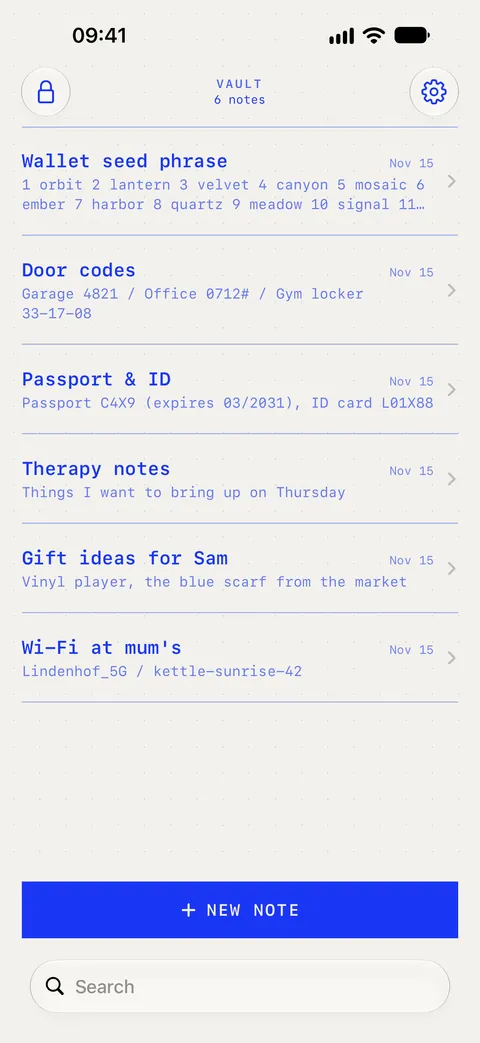
The free version has 1 vault and 5 notes with the same encryption as Pro, enough for a handful of codes. Pro adds unlimited notes and unlimited hidden vaults.
Where each secret belongs
| Secret | Best place | Why |
|---|---|---|
| Website and app logins, passkeys | Passwords app | End-to-end encrypted, offered when you sign in |
| PINs, security questions | Notes field in Passwords | Apple suggests exactly this |
| 2FA backup codes, recovery keys | Paper, plus Passwords notes or an offline vault | You need them when the phone or the account is the problem |
| Door codes, ID numbers | Note with a custom Notes password, or an offline vault | No login to attach them to |
| Crypto seed phrase | Paper or metal first | How to store a seed phrase on iPhone |
FAQ
Is it safe to keep passwords in the Notes app on iPhone?
Not in a normal note: with standard data protection, Apple holds the keys to iCloud Notes. A note locked with a custom Notes password is end-to-end encrypted and fine for a few codes. Logins belong in the Passwords app.
Where are saved passwords stored on iPhone?
On iOS 18 and later, in the Passwords app. With iCloud Keychain on, they sync end-to-end encrypted to your other devices. With it off, Apple says they're "stored locally on your device".
Can I store passwords on iPhone without iCloud?
Yes. Turn off Sync this iPhone under Settings → [your name] → iCloud → Passwords, or keep them in an offline vault like Secret Notes Vault, which has no cloud at all. Either way, keep a paper backup of what matters.
Should I keep 2FA backup codes on my iPhone?
Keep one copy on paper: you need those codes exactly when your phone or account fails. A second copy can go in the notes field of the matching entry in Passwords, where Apple suggests keeping recovery key information, or in an offline encrypted vault.